
Download Mac OS X Lion Skin Pack – Transform Windows 7 into a Lion‑Styled Desktop
Overview
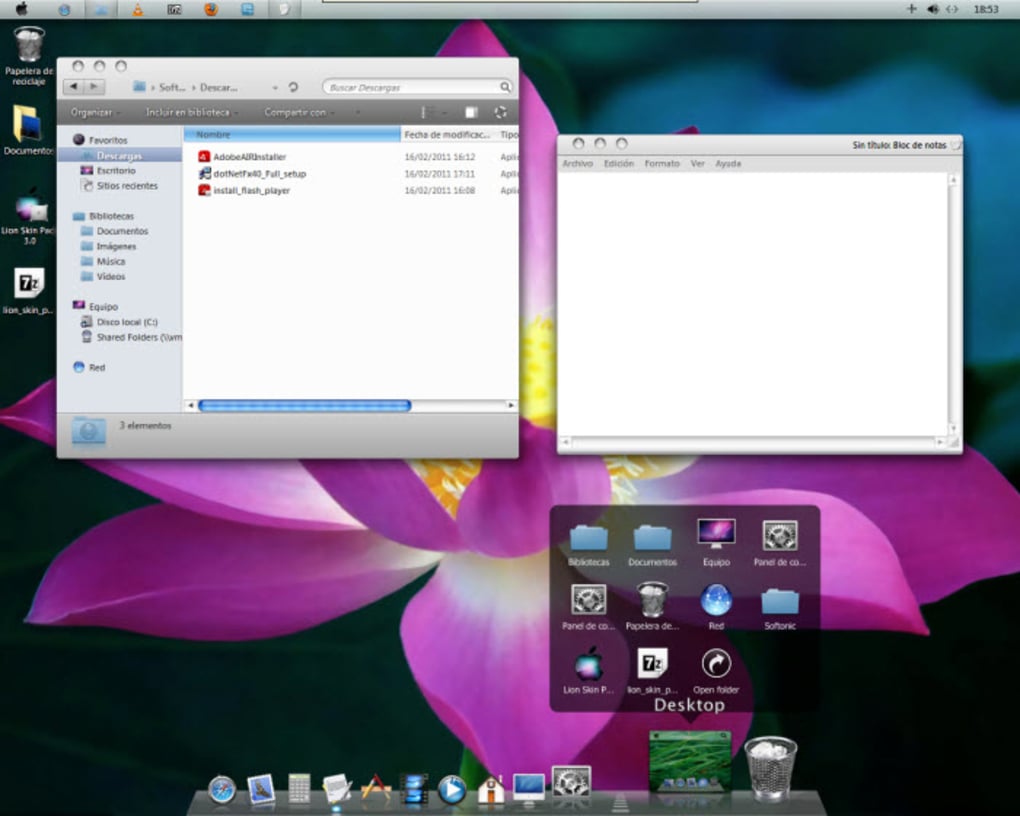
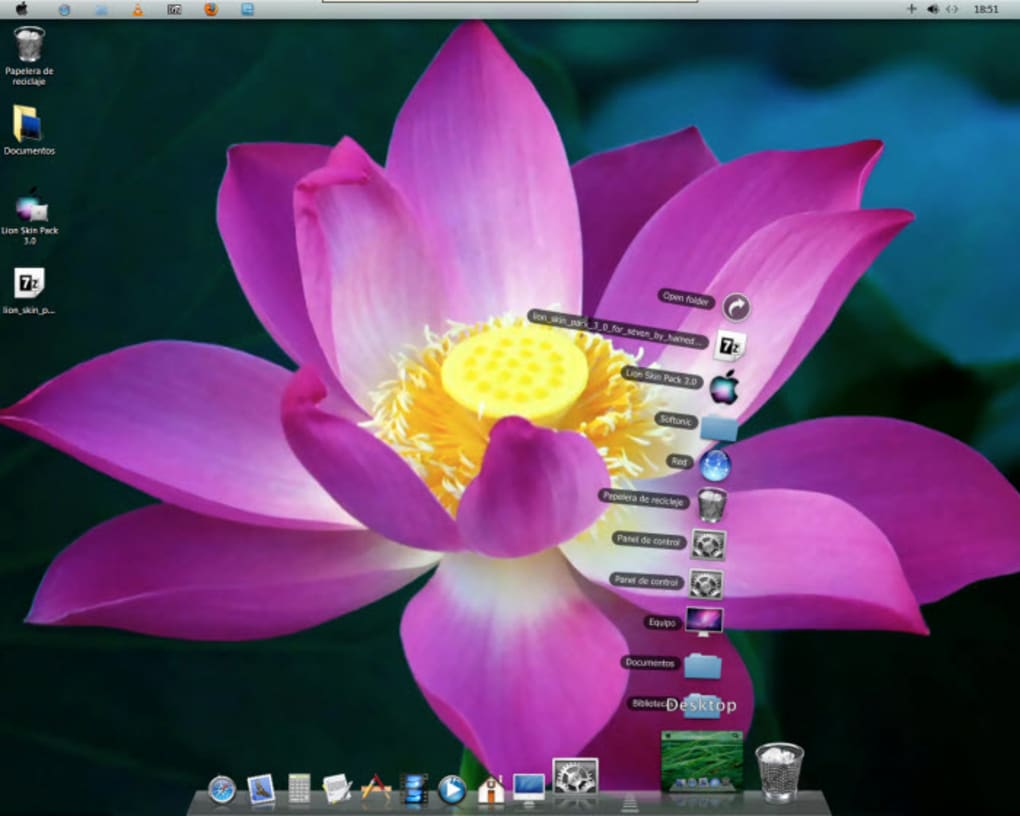
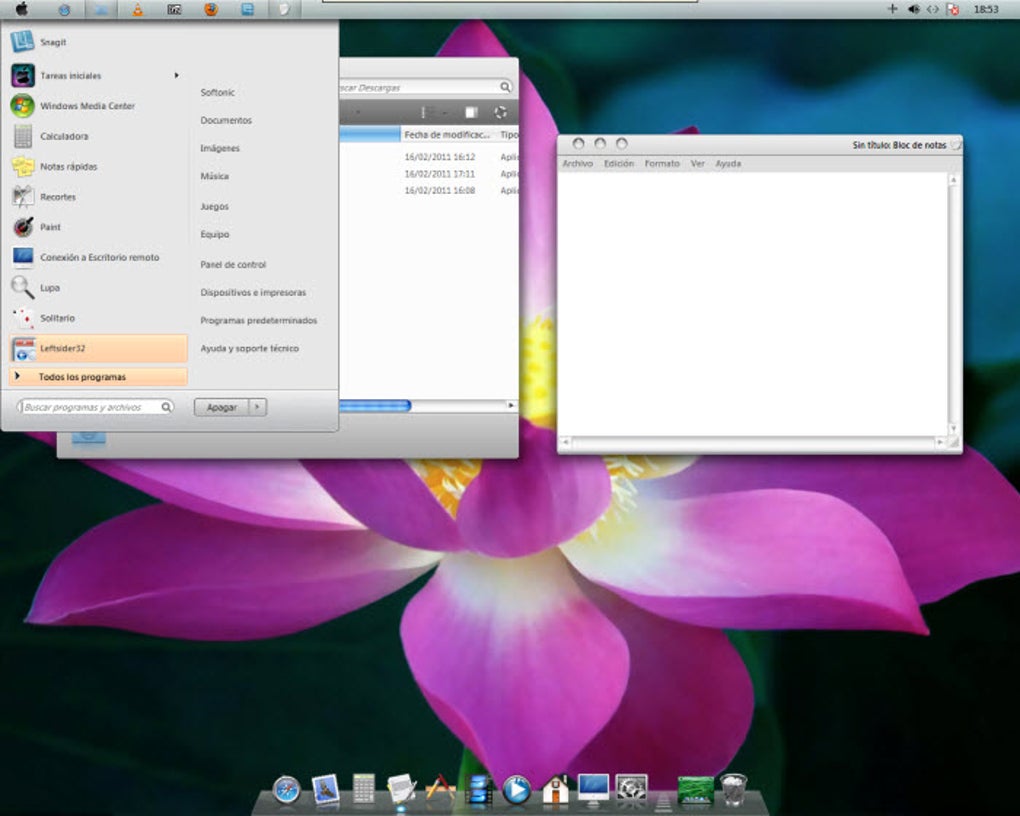
The Mac OS X Lion Skin Pack is a visual makeover tool that lets Windows 7 users experience the sleek aesthetics of Apple’s Lion operating system without buying a Mac. Designed for fans of clean, minimalist design, this skin pack replaces the classic Windows icons, window frames, taskbar, and even the Dock with faithful recreations of Lion’s UI elements. While it does not add functional features such as Spaces, Finder, or Spotlight, the transformation is striking enough to convince friends and coworkers that you’re running a genuine macOS environment. The pack is completely free, easy to download, and works with any Windows 7 installation—whether it’s a fresh build or an older system that has been customized over the years. Because the package only alters graphical assets, it leaves core system performance untouched, ensuring that your PC remains fast and stable while looking spectacularly modern.
In today’s cross‑platform world, many users appreciate the elegance of macOS but are tied to Windows for work or gaming. The Lion Skin Pack bridges that gap, providing a safe, secure, and reversible way to refresh your desktop. The package includes high‑resolution icons for folders, drives, and system shortcuts, custom‑styled windows with rounded corners, a transparent Dock that mimics Lion’s behavior, and a refined Trash can animation.
All assets are vector‑based, so they scale cleanly on high‑DPI monitors. Moreover, the skin pack is regularly updated by the developer community, meaning you’ll receive bug fixes and visual tweaks that keep the look consistent with Apple’s design language. If you’re looking for a free, low‑effort way to give Windows 7 a fresh identity, the Mac OS X Lion Skin Pack is arguably the most polished solution available.
Key Features
- Authentic Lion Window Frames: Rounded corners, subtle drop‑shadows, and the iconic gray title bar that matches OS X Lion’s aesthetic.
- Custom Dock: A fully functional Dock that supports drag‑and‑drop shortcuts, animated magnification, and a transparent background.
- Icon Set Overhaul: Over 150 high‑resolution icons for folders, drives, system utilities, and common file types, all styled after Lion’s sleek palette.
- Trash Can Animation: A realistic trash can that visually empties when you delete items, replicating the macOS experience.
- High‑DPI Support: Vector‑based graphics ensure crisp appearance on 1080p, 1440p, and 4K displays.
- Easy Revert Option: A one‑click restore feature that returns Windows to its default theme without registry hacks.
- Lightweight Installation: The skin pack adds less than 30 MB of data, keeping your system’s storage footprint minimal.
- Community‑Driven Updates: Regular patches and new icon packs released by an active user forum.
Beyond the visual enhancements, the Lion Skin Pack is built on top of the popular WindowBlinds engine, which guarantees compatibility with Windows 7’s theme architecture. This means you can mix and match the Lion skin with other third‑party visual styles if you prefer a hybrid look. The skin also respects Windows’ native accessibility settings, so high‑contrast mode and screen‑reader support remain intact. Because the pack only modifies graphical resources, there’s no impact on system security or performance, making it a safe choice for both home users and corporate environments that enforce strict IT policies.
Installation & Usage Guide
Step‑by‑Step Installation
- Download the latest Mac OS X Lion Skin Pack from the official website or a trusted software repository.
- Extract the ZIP archive to a temporary folder on your desktop.
- Run the
Setup.exefile as an administrator (right‑click → “Run as administrator”). - Follow the on‑screen wizard: accept the license agreement, choose the installation directory (default is
C:\Program Files\LionSkin), and click “Install”. - When prompted, allow the installer to modify Windows theme files. This step is required for the skin to replace the default UI elements.
- After installation, open the WindowBlinds Control Panel (installed automatically) and select “Mac OS X Lion” from the list of available themes.
- Click “Apply” and wait a few seconds while Windows refreshes the graphical assets.
- Log out and log back in, or simply restart your computer for the changes to take full effect.
The entire process typically takes under five minutes on a modern PC. If you encounter any issues, the installer includes a “Repair” option that can restore missing files. Additionally, a Reset.bat script is placed in the installation folder; running this script will revert Windows to its original theme without requiring a full reinstall.
Using the Lion‑Styled Desktop
Once the theme is active, you’ll notice the new Dock appearing at the bottom of the screen. You can customize the Dock by right‑clicking on any shortcut and selecting “Add to Dock”. Dragging items onto the Dock will automatically create a Lion‑styled shortcut. The new window frames behave exactly like standard Windows windows—maximizing, minimizing, and resizing work as expected—only the visual style is different. To access the traditional Windows taskbar, simply move your mouse to the bottom edge; the Dock will hide automatically, revealing the classic taskbar underneath.
For power users, the WindowBlinds control panel offers advanced options such as adjusting the Dock’s transparency level, changing the animation speed, and swapping individual icon sets. These settings are saved per user profile, so multiple users on the same machine can enjoy personalized looks without interfering with each other. Remember to back up your custom configurations by exporting the theme file—this makes it easy to reinstall the skin on a new PC or after a major Windows update.
Compatibility, Pros & Cons
The Mac OS X Lion Skin Pack is officially compatible with Windows 7 (32‑bit and 64‑bit). It also works on Windows 8 and Windows 10 when run in compatibility mode, though some visual elements may appear slightly misaligned due to differences in the underlying theme engine. The skin does not support Windows Vista or earlier versions, and it is not designed for Windows 11, where the native UI already shares many macOS‑like traits.
Pros
- Free download with no hidden fees.
- High‑quality, retina‑ready graphics that faithfully replicate Lion’s look.
- Lightweight and does not degrade system performance.
- Easy one‑click revert to the original Windows theme.
- Regular community updates keep the skin current with minor OS changes.
- Customizable Dock and icon sets for a personalized experience.
Cons
- Only visual changes; functional macOS features like Spaces, Finder, or Spotlight are absent.
- Requires the third‑party WindowBlinds engine, which some corporate IT policies may restrict.
- Minor alignment issues may appear on non‑standard screen resolutions.
- No official support for Windows 11, limiting future‑proofing.
Overall Verdict: The Lion Skin Pack delivers a premium visual overhaul for Windows 7 at zero cost, making it an excellent choice for users who crave macOS aesthetics without sacrificing Windows functionality.
FAQ & Conclusion
Is the Mac OS X Lion Skin Pack safe to download?
Yes. The skin pack is distributed as a clean ZIP file without any bundled malware. Always download it from the official site or a reputable software repository to avoid tampered versions.
Will the skin affect my system performance?
No. The pack only replaces graphical assets and adds a lightweight Dock. It consumes less than 30 MB of RAM and has a negligible impact on CPU usage.
Can I uninstall the skin and return to the default Windows theme?
Absolutely. The installation includes a “Reset” script that restores the original Windows theme with a single click, or you can uninstall via Control Panel > Programs.
Does the skin work on Windows 10 or Windows 11?
It works on Windows 10 when run in compatibility mode, though some UI elements may need manual tweaking. Windows 11 is not officially supported due to major UI changes in that OS.
Do I need an internet connection after installation?
No. Once installed, the skin operates entirely offline. An internet connection is only required to download updates or additional icon packs.
In summary, the Mac OS X Lion Skin Pack offers a high‑impact visual makeover for Windows 7 users who admire Apple’s design language. It’s free, easy to install, and safe—making it a risk‑free way to freshen up an older PC. While it does not add functional macOS features, the impressive graphics, customizable Dock, and lightweight footprint more than compensate for the missing utilities. If you’re ready to give your Windows 7 desktop a sleek, modern look that will impress both colleagues and friends, download the Lion Skin Pack today and enjoy a taste of macOS elegance without leaving the Windows ecosystem.







